
modelPackager

Information
The Packager block creates a packager object to which payload can be added by subsequent blocks.
Advanced parameter settings
With the default parameter settings the buffer size (size of the serialized package), as well as the sample time of the block is determined automatically by
backward propagation. However, that values may also be set manually. An example there this functionality is used is the TestSerialPackager model. In that model the parameter sampleTime is explicitly set, since backward propagation is not possible in that case.
Examples
The block is used in several examples, e.g. in,
TestSerialPackager_UDP.
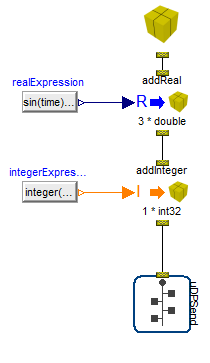
The figure below shows an arrangement in which a Packager object is created and after that a payload of three Real values
and one Integer value is added, serialized and finally sent using UDP.
Parameters
| Type | Name | Default | Description |
|---|---|---|---|
| Advanced › Activation | |||
| Boolean | enableExternalTrigger | false | true, enable external trigger input signal, otherwise use sample time settings below |
| Boolean | useBackwardSampleTimePropagation | true | true, use backward propagation for sample time, otherwise switch to forward propagation |
| Modelica.Units.SI.Period | sampleTime | 0.01 | Sample time if forward propagation of sample time is used |
| Advanced › Buffer size settings | |||
| Boolean | useBackwardPropagatedBufferSize | true | true, use backward propagated (automatic) buffer size for package, otherwise use manually specified buffer size below |
| Integer | userBufferSize | 16*1024 | Buffer size for package if backward propagation of buffer size is deactivated |
Connectors
| Type | Name | Default | Description |
|---|---|---|---|
| Interfaces.PackageOut | pkgOut | ||
| Modelica.Blocks.Interfaces.BooleanInput | trigger |