
modelInterpolator
Demonstrate usage of Interpolator
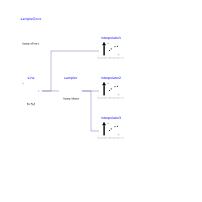
Extends from Modelica.Icons.Example (Icon for runnable examples).
Information
This example demonstrates the usage of the Interpolator block. This block is used in multi-rate controllers to interpolate between two different sample rates. In this example, a sampled sine-signal is interpolated in different ways:
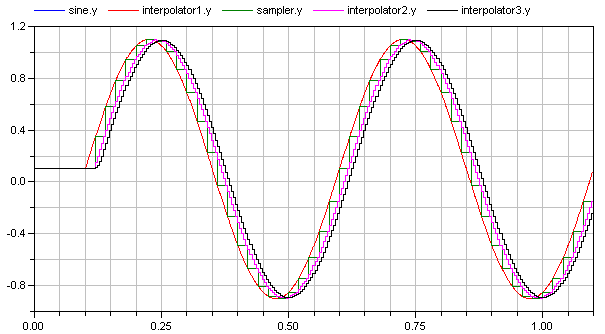
- A "sine" signal (= blue and red curve in the figure below) is sampled with 20*Ts (= green curve in the figure below) where Ts is the sample time of 1 ms.
- This "sine" signal is interpolated with "interpolator1" which has a "continous" blockType. In this case, the interpolator just passes the input signal (y = u) and therefore the signal is identical to the sine signal (therefore the blue and the red curve are the same).
- The sampled sine signal is interpolated with "interpolator2" to arrive at a sample time of 4*Ts (= violet curve in the figure below). This gives a 20*Ts delay and a sine signal sampled with 4*Ts (instead of 20*Ts).
- In order to remove frequencies introduced by the interpolation, "interpolator3" additionally filters the linearly interpolated signal with a mean value filter of the same length (= black curve in the figure below). This gives an additional delay (= a total delay of 24*Ts), but results in a filtered interpolation signal.
Components
| Type | Name | Default | Description |
|---|---|---|---|
| Modelica.Blocks.Sources.Sine | sine | ||
| SampleClock | sampleClock | ||
| Modelica_LinearSystems2.Controller.Interpolator | interpolator1 | ||
| Modelica_LinearSystems2.Controller.Interpolator | interpolator2 | ||
| Modelica_LinearSystems2.Controller.Interpolator | interpolator3 | ||
| Sampler | sampler |