
modelMultiDomainCIM
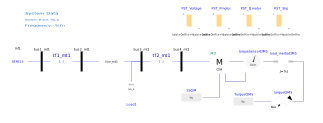
Extends from Modelica.Icons.Example (Icon for runnable examples), OpenIMDML.Examples.BaseClasses.ValidationPartial2 (Partial model 2 for validation purposes).
Information
The example MultiDomainCIM5andCIM6 contains a multi-domain three-phase of the PSSE CIM family of induction motor models, which drives a mechanical load. The three-phase induction motor CIM5orCIM6 is based on the non multi-domain model from Siemens PTI, PSS®e 34.2.0 model library, Siemens Power Technologies International, Schenectady, NY (2017).
In order to validate the multi-domain model, this validation example reproduces Example 11.7 Motor Startup from Chow, Joe H., and Juan J. Sanchez-Gasca. Power system modeling, computation, and control. John Wiley & Sons, 2020. The illustration in the book underwent slight modifications to accommodate a GENCLS model functioning as a generator (infinite bus model). The simulation outcomes, generated using the Power System Toolbox (PST) featured in the book's illustration, are organized in a table format. This facilitates users in comparing their Modelica simulations with the presented results.
The startup example from the book utilizes a three-phase type III induction motor . In this particular Modelica validation example, the idea is to test the more detailed model induction motor from the CIM family to compare results.
Simulate the system for 10 seconds. Variables of interest are:
CIM.sCIM.wrCIM.PCIM.QCIM.Pmotor
PST Motor Startup Simulation Guide
If the user chooses to initiate a motor startup simulation in PST, proceed with the following steps:
- Download the PST software: PST;
- Extract the zip files;
- Place a copy of the MATLAB example files (PST_motor_startup_example.m and data_file_motor_startup.m) from the OpenIMDML Github repository to the PSTv3 folder (in the extracted PST folder);
- Run PST_motor_startup_example.m example in MATLAB and select the data_file_motor_startup.m data file;
- The simulation will initiate, continue following the steps displayed on the screen.