modelDetailedHouse2
Extends from DetailedHouse1.
Information
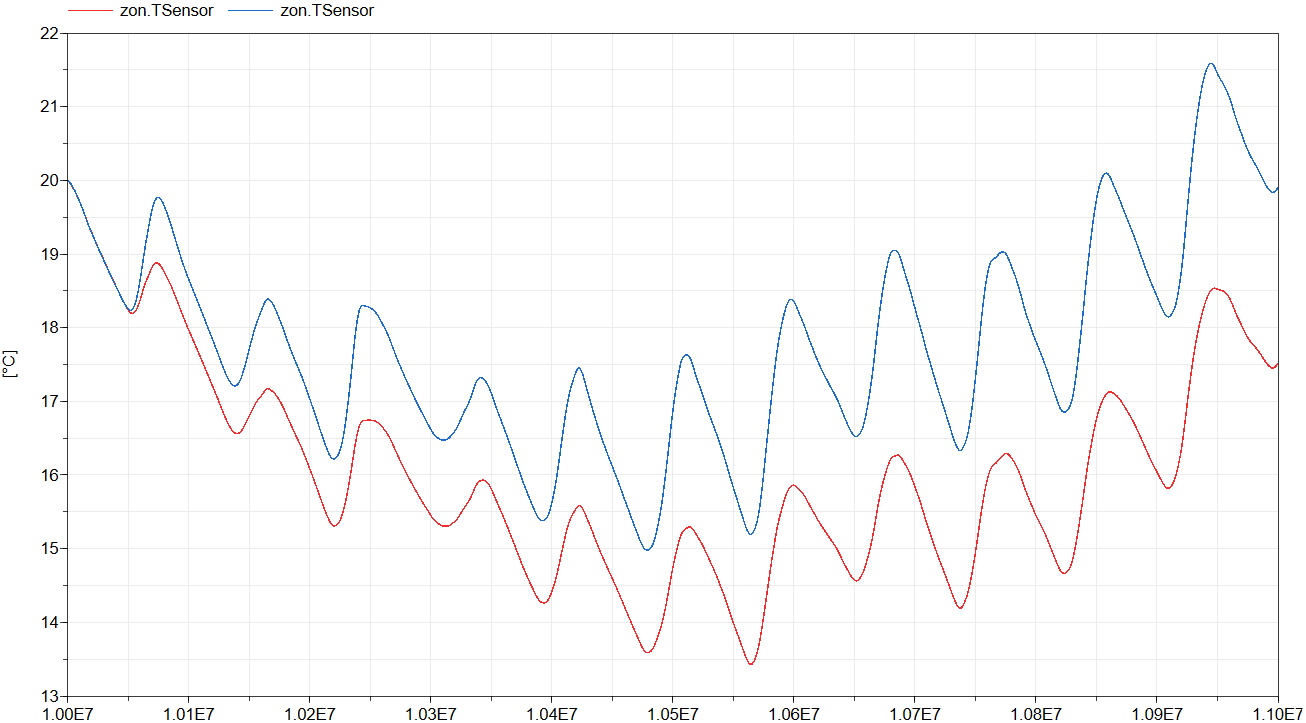
This model extends from IDEAS.Examples.Tutorial.DetailedHouse.DetailedHouse1 and adds a solar shading screen to the window model. Compare the simulation outputs to see the impact on the zone temperature.
Required models
- Modelica.Blocks.Sources.Constant
- IDEAS.Buildings.Components.Shading.Screen: This model is used internally and can be set in the window's parameter window. It should not be dragged and dropped.
Connection instructions
Solar shading is a property of the window and can be selected using the replaceable model shaType.
A drop-down menu lists all available options. Each option may include custom parameters, which can be configured by pressing the Edit button next to the drop-down menu.
The Screen model requires an external control signal to determine whether the screen is extended or retracted.
An input appears on the Window icon for this purpose. Ensure that this input is connected to the appropriate control signal.
See the window input comment for more information on how to choose the control signal.
Reference result
The figure below shows the operative zone temperature with (red) and without (blue) the shading model.
Components
| Type | Name | Default | Description |
|---|---|---|---|
| Modelica.Blocks.Sources.Constant | con | Solar screen's external control signal |